Ultimate Visual Piano Chord Guide for Beginners
GUIDES
1/10/20263 min read
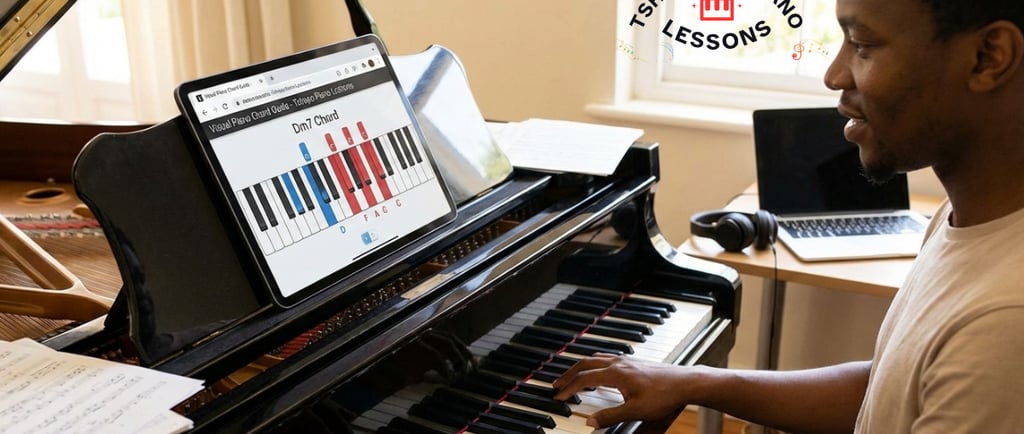
Learning the piano is one of the most rewarding journeys a musician can take, but it often comes with a steep learning curve. While video tutorials are fantastic for seeing a performance in action, they can be difficult to reference in the heat of a practice session. Have you ever found yourself scrubbing through a 15-minute video just to find the fingering for a single Dm7 chord?
That is exactly why the Visual Piano Chord Guide was created. Hosted here at Tshepho Piano Lessons, this interactive tool is designed to bridge the gap between watching a lesson and actually mastering the keyboard.
Why Use a Visual Chord Guide?
The traditional way of learning involves heavy books or endless video playback. However, music is a visual and tactile language. A visual guide offers several advantages:
Instant Reference: No more pausing and rewinding. You select your key and chord type, and the notes appear instantly.
Two-Hand Coordination: Most chord charts only show the right hand. This guide specifically differentiates between what your left hand and right hand should be doing.
Cross-Platform Accessibility: Whether you are sitting at a grand piano with a laptop or practicing on a MIDI keyboard with your phone propped up, the tool is fully responsive.
Completely Free: There are no subscriptions or paywalls. All you need is a device and an internet connection.
Exploring the Features of the Guide
The Visual Piano Chord Guide is more than just a static image; it is a dynamic software tool tailored for players at any level. Here is a breakdown of what you can do with it.
1. All 12 Keys Covered
Whether you are playing a simple pop song in C Major or a complex jazz piece in F#, the guide covers every single key on the chromatic scale. This is vital for players who want to move beyond the "white keys" and master the full range of the piano.
2. Comprehensive Chord Types
Many beginners stop at Major and Minor chords. To become a versatile player, you need to understand the "flavor" of different chord extensions. The tool allows you to filter by:
Basic Triads: Major, Minor, Diminished, and Augmented.
Seventh Chords: Major 7th, Minor 7th, and Dominant 7th.
Advanced Variations: Half-diminished, Suspended 2 (Sus2), and Suspended 4 (Sus4).
3. Left Hand vs. Right Hand Visuals
One of the most unique features of the Tshepo Piano Lessons tool is the color-coded system:
Blue Column (Left Hand): Shows you the bass notes or octaves you should be playing.
Red Column (Right Hand): Displays the specific notes of the chord triad or extension.
This "tactical" layout helps you visualize the physical distance between your hands, which is often the hardest part for beginners to grasp.
How to Use the Tool: A Step-by-Step Example
To get started, head over to Tshephopianolessons.co.za and navigate to the "Tools" section to find the Visual Piano Chord Guide.
Learning the Key of C Major
If you are just starting, you likely want to learn the chords in the key of C.
Select C from the key list.
The guide will show you the root chord: C Major.
The Blue display will indicate your left hand should play a C.
The Red display will show your right hand playing the notes C, E, and G.
Moving to the "Two Chord" (D Minor)
In the key of C, the second chord is D Minor.
Simply click D and select Minor as the type.
The interface updates instantly. Now, your left hand is on D, and your right hand is positioned on D, F, and A.
This interactive switching allows you to build "muscle memory" by seeing the shapes change in real-time as you move your fingers on your physical piano.
Beyond the Basics: Augmented and Diminished Chords
As the transcript highlights, many players know how to play in their favorite keys but get stuck when they see "Augmented" or "Diminished" in a lead sheet.
Augmented Chords: These add a sense of tension and "dreaminess" to music. If you are playing in F# and need an augmented chord, the guide will show you exactly which sharp notes to hit.
Suspended Chords (Sus2/Sus4): These are the "secret sauce" of contemporary worship and pop music. They provide a feeling of unresolved longing. Using the guide to visualize the difference between a Csus2 and a Csus4 can transform your playing overnight.
A Tool for Every Skill Level
For Beginners
The guide acts as a safety net. When you watch a YouTube tutorial and find yourself forgetting the chords five minutes later, you don't need to go back to the video. You can simply keep the Visual Chord Guide open in a tab and use it as a quick-glance cheat sheet.
For Intermediate Players
If you are looking to refresh your memory on specific keys or want to experiment with different voicings (like using octaves in the left hand versus single notes), the filtering system allows you to customize the view to match your current skill level.